



Inventory
Company Property Tag
Property label (company) with company name, asset number and QR code – for asset tracking and identification.
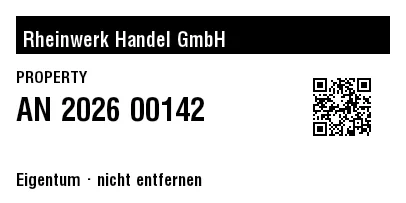
Rendered from this template's ZPL - exactly how the label leaves the printer. Click to enlarge.
ZPL code
^XA
^MD15
^PR5
^LL203
^PON
^PQ1,0,0,N
^MUd
^PW406
^MNY
^LH0,0
^PMN
^CI28
^BY,2,2,0
^FO16,16
^GB374,38,38,B
^FS
^FO23,25
^GB360,28,28,B
^FS
^FR
^FWN
^FO23,31
^A0,20
^FB360,1,6,L,
^FDRheinwerk Handel GmbH
^FS
^FO313,76
^BQN,2,2,M
^FDA,https://zplcloud.com/a/AST-2026-00142
^FS
^FWN
^FO16,71
^A0,16
^FB266,1,4,L,
^FDPROPERTY
^FS
^FWN
^FO16,97
^A0,31
^FB266,1,8,L,
^FDAN 2026 00142
^FS
^FWN
^FO16,173
^A0,17
^FB374,1,4,L,
^CI28
^FDEigentum · nicht entfernen
^FS
^XZ
Property label (company) with company name, asset number and QR code – for asset tracking and identification.
What is this label for?
It permanently marks company assets: company name, asset number and QR code for asset tracking and identification.
What this template contains
- Company
- Asset number
- QR code
When to use it
- Inventory and asset tracking
- Warehouse and shelf labeling
- Manufacturing and serial numbers
How to edit it in the editor
Open it in the visual editor, change text, sizes, fonts and barcodes by clicking on each element and export to ZPL, PNG or PDF.